
File a Workers Comp Claim
If an employee gets hurt on the job, it’s important to take care of the injury first, and then file a claim. The process is fully documented below.
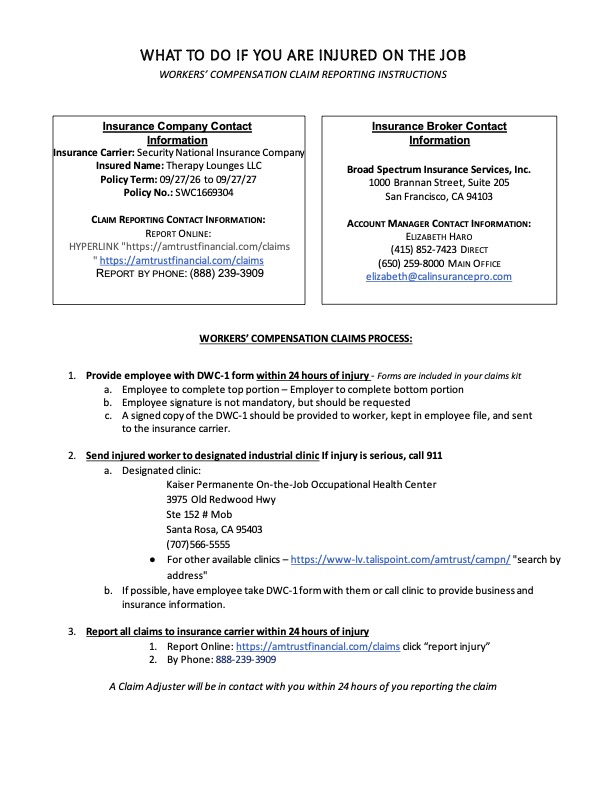
1. (OWNER) We require that all employees report job-related accidents or injuries to the manager immediately, whether the accident occurred on or off company premises.
2. (MANAGER) Get the injured employee medical attention immediately by:
- Send injured worker to designated industrial clinic. If injury is serious, call 911
- Designated Clinic:
- Kaiser Permanente On-the-Job Occupational Health Center
- 3975 Old Redwood Hwy
- Ste 152 # Mob
- Santa Rosa, CA 95403
- (707)566-5555
- For other available clinics; go to https://www-lv.talispoint.com/amtrust/campn/
- Search By Address
- Employees who have predesignated can be sent to their personal physician.
3. (EMPLOYEE) Submit Workers Comp Incident Report through the Employee Reporting Portal
4. (MANAGER) Notification & Documentation:
- Bar Manager should notify Owner In Charge (in 24 hours).
- Bar Manager should work with injured employee to complete Workers Comp Claim Form (DWC1) (in 48 hours). https://www.dir.ca.gov/dwc/dwcform1.pdf
5. (MANAGER or OWNER) File a claim with Amtrust Financial:
- Call Customer Service Center 888.239.3909 or
- Report Online: https://amtrustfinancial.com/claims click “report injury”
6. (OWNER) Update the annual log of individual claims on Dropbox. The editable PDF log files can be found here:
- Beaux: Dropbox->Documents->All Bars->OSHA – Beaux-><Year> Beaux 300 OSHA Log of Work Related Injuries.pdf
- Edge: Dropbox->Documents->All Bars->OSHA – Edge-><Year> Edge 300 OSHA Log of Work Related Injuries.pdf
- MSun: Dropbox->Documents->All Bars->OSHA – MSun-><Year> MSun 300 OSHA Log of Work Related Injuries.pdf
- Rainbow: Dropbox->Documents->All Bars->OSHA – Rainbow-><Year> Rainbow 300 OSHA Log of Work Related Injuries.pdf

